

Tacos.
Kebabs.
Sandwiches.
Burgers.
Ice-cream.
Your customers like what you sell. They visit your food truck when they can. You might know their face. But that’s all.
As a food truck owner, you know that business will only grow if you can retain your customers. You know:
- Getting John to visit your food truck 2x more per week.
- Getting Mary to bring her friends along for lunch. Every week.
- Getting Sean to buy ice-cream from you and never think twice about going elsewhere.
But guess what?
Paper (flyers and loyalty cards) don’t cut it anymore.
Getting your customers on an email list isn’t enough.
Relying just on word of mouth isn’t big enough.
Getting your customers to download yet another app isn’t going to work.
Being the food truck of choice is what you need. And to do so requires you to be smart about how you set up your loyalty program so that you can continue winning more and keeping your customers.
This post will show you how to create a digital loyalty program that will drive customers back to your food truck. And make sure that they are your customers for life.
By the end of this post, you will be able to go live with your digital loyalty program and start distributing cards to your customers like this:
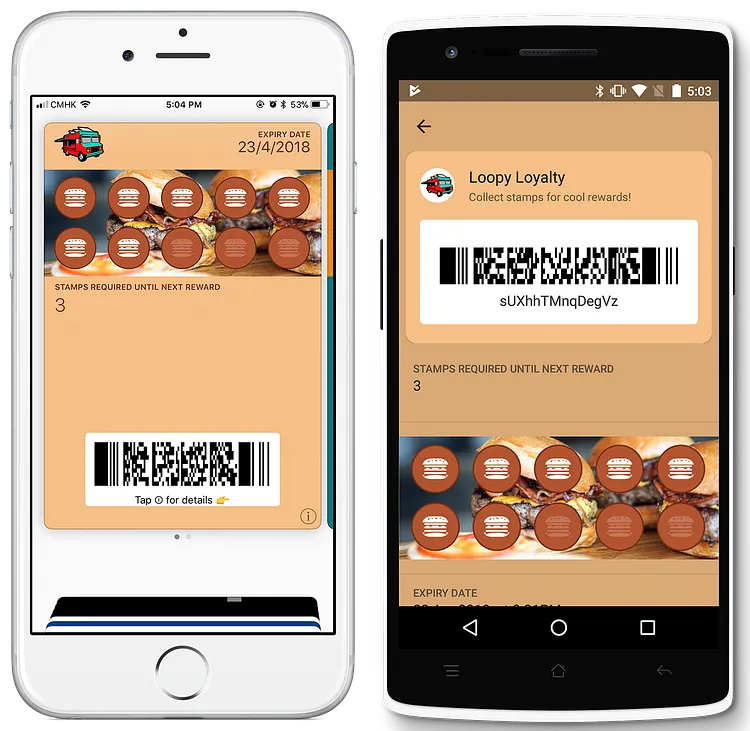
Try out the loyalty card above!
Click here to save the sample food truck loyalty card to Apple Wallet and Google Pay and experience it for yourself!
Step 1 — Design your Food Truck Loyalty Card
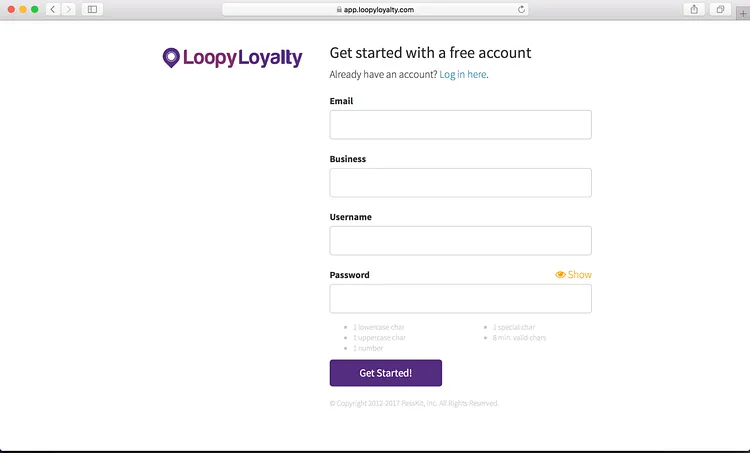
1 — Create a Loopy Loyalty account.
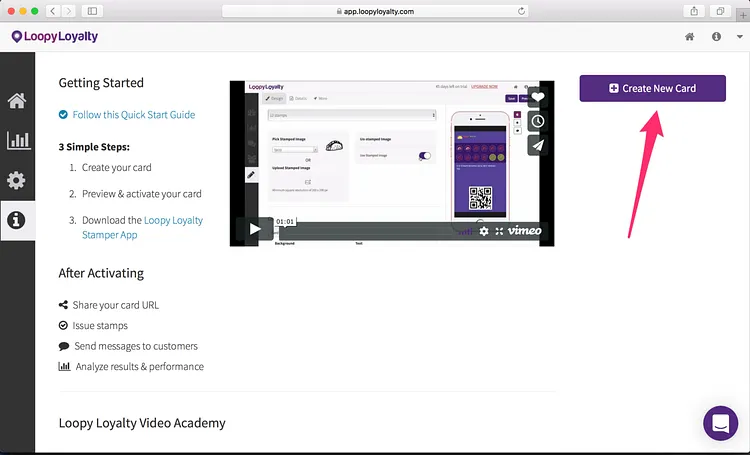
2 — Create a new loyalty card by clicking on the button or in the dropdown menu.
3 — Choose a digital loyalty card type for your food truck:
- Single reward: 1 reward after collecting all stamps/punches.
- Multi reward: multiple rewards at different points on the loyalty card.
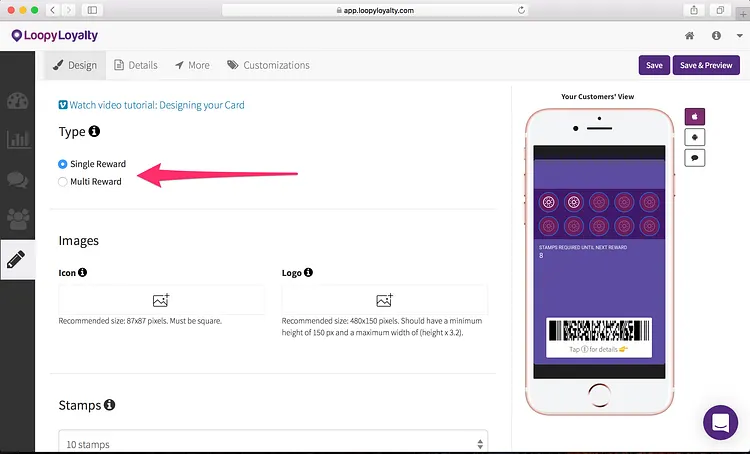
Single reward digital loyalty card examples:
- Buy 1 burrito to get 1 stamp. Collect 10 stamps and get 1 free burrito.
- Get 1 stamp for every breakfast combo purchased. Collect 8 stamps to 50% off your next breakfast combo.
- Spend $5 to get 1 stamp. Get $10 off your next purchase after collecting 10 stamps.
- Get 1 stamp for every ice-cream purchased. Buy 12 ice-creams to get 1 free.
Multi reward digital loyalty card examples:
1. Get 1 stamp for every salad/sandwich purchased.
- Collect 5 stamps to get 10% off your next purchase.
- Collect 10 stamps to get a free drink.
- Collect 15 stamps to get a free salad/sandwich.
2. Get 1 stamp for every $5 you spend.
- Collect 4 stamps to get 1 free taco.
- Collect 8 stamps to get 1 free margarita.
- Collect 12 stamps to get 1 free quesadilla.
3. Get 1 stamp for every shawarma you purchase.
- Collect 3 stamps to get 1 free side drink.
- Collect 6 stamps to get 1 free side salad.
- Collect 9 stamps to get 1 free shawarma.
4 — Upload your logo (2 images). You can see where these images will appear on the right hand side.
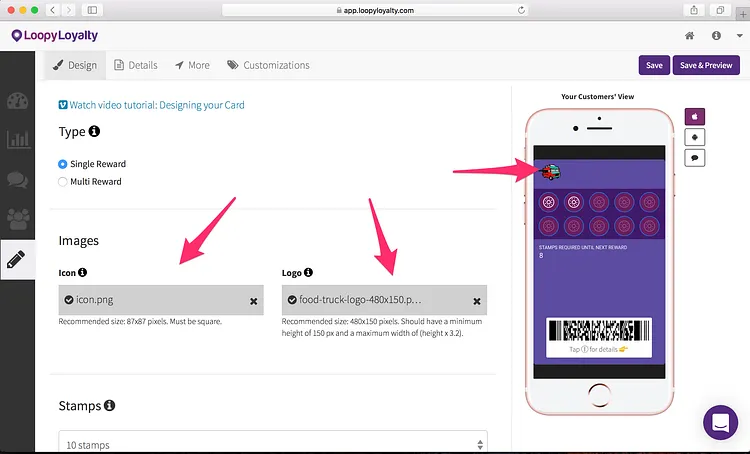
- Icon image — we recommend using an image that is 87 x 87 pixels. This image will appear on the lock screen — next to all of your lock screen messages.
- Logo image — we recommend using an image that is 480 x 150 pixels. This will appear on the front of your digital loyalty card.
Here are some pointers on uploading your icon and logo image.
5 — Determine how many stamps you want on your food truck loyalty card. Select up to 30 stamps.
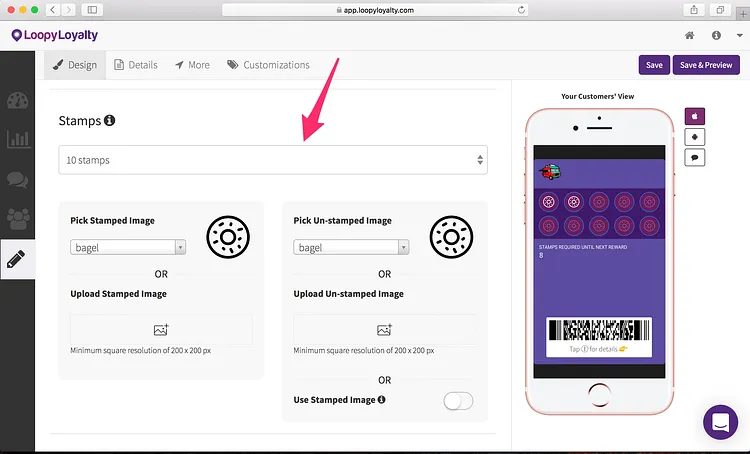
6 — Select your stamp and unstamped images from the gallery or upload your own. You can preview how this looks on the right hand side.
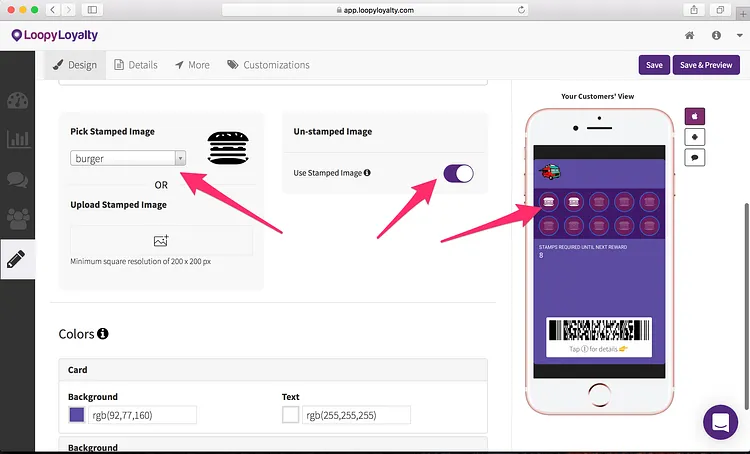
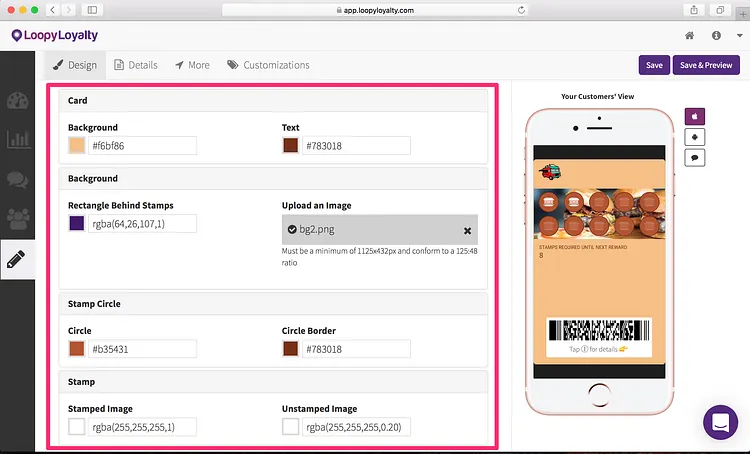
7 — Bring your digital loyalty card to life by adjusting the colors of your card, stamps, and circles behind the stamps.
You can even add a custom image behind the stamps like the one shown below. Here are instructions on how to upload a custom background image.
Step 2 — Your Digital Loyalty Program Details
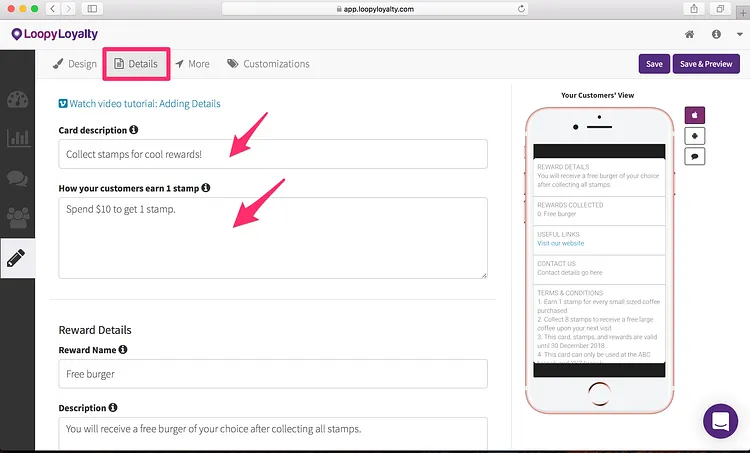
1 — Click on the ‘Details’ tab at the top.
Add in your digital loyalty program description. For example “Get rewarded at Burgers R Us!” or “Your Digital Loyalty Card” or “Collect stamps for cool rewards!”. This will appear on the back of your card in Apple Wallet and on your digital loyalty program enrollment page.
Then describe what your customers need to do to earn 1 stamp. For example “Spend $10 to get 1 stamp” or “Get 1 stamp for every burger you purchase”.
2 — Let customers know what they will get for collecting all stamps.
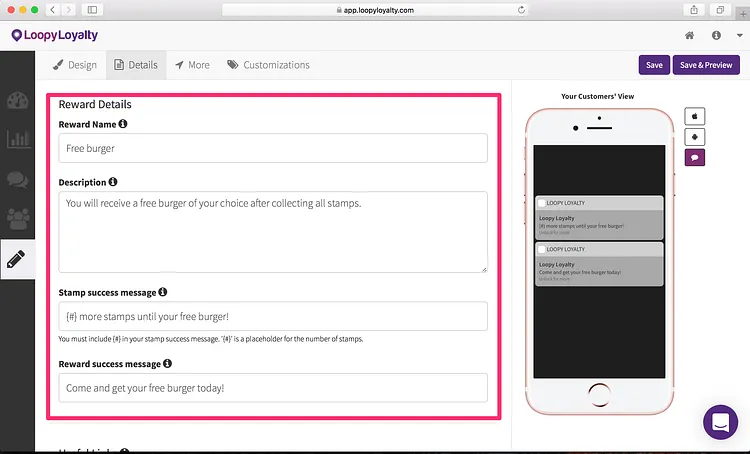
- Enter name of your reward (e.g. “Free burger”).
- Enter the description of the reward (e.g. “You will receive a free burger of your choice after collecting all stamps.”).
- Stamp success message: the message customers will receive every time they earn a stamp. “{#} more stamps until your free burger!”. Important: use the {#} as the placeholder. The {#} will be replaced by the actual number of stamps.
- Reward success message: the message customers will see when they’ve earned a reward. “Come and get your free burger today!”
3 — Add links to your digital loyalty card: your address, your Facebook page, phone number, website and more.
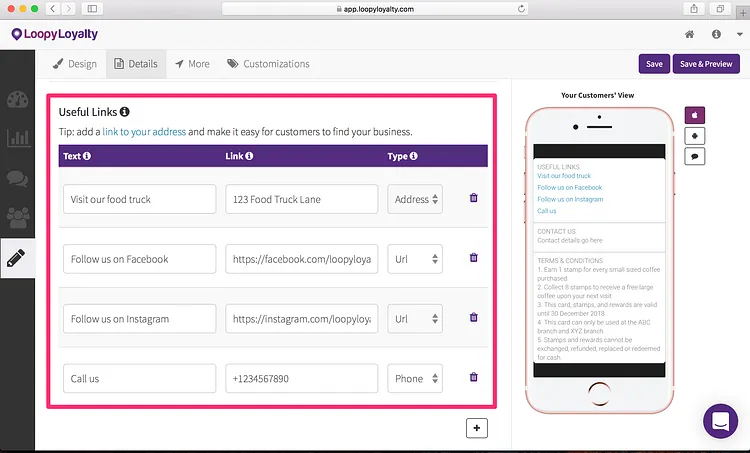
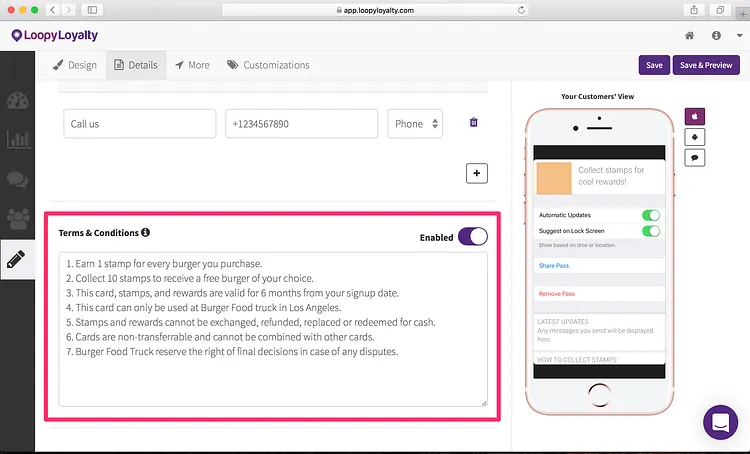
4 — Add in the terms and conditions for your food truck digital loyalty program. We’ve provided some sample terms and conditions for you — simply swap out text where appropriate.
Don’t want terms and conditions? You can disable it.
Step 3 — Expiry, Data Collection, and Location Based Messages
1 — Click on the ‘More’ tab at the top.
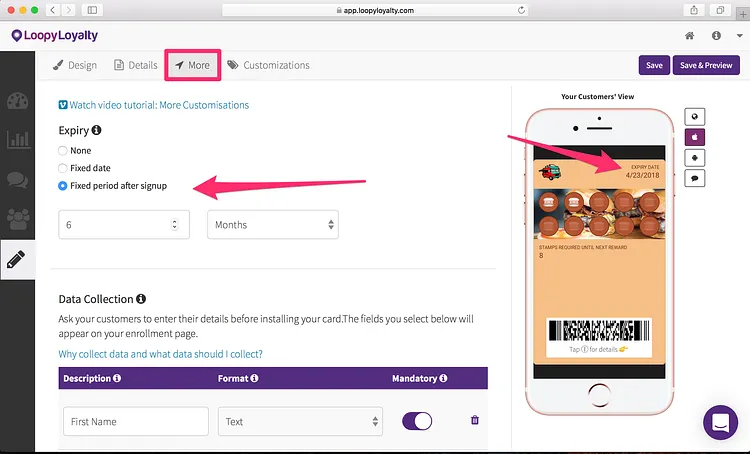
Choose an expiry option for your digital loyalty card. For example:
- Cards will never expire
- Cards will expire on 31 December 2018
- Cards will expire 6 months after a customer signs up for it
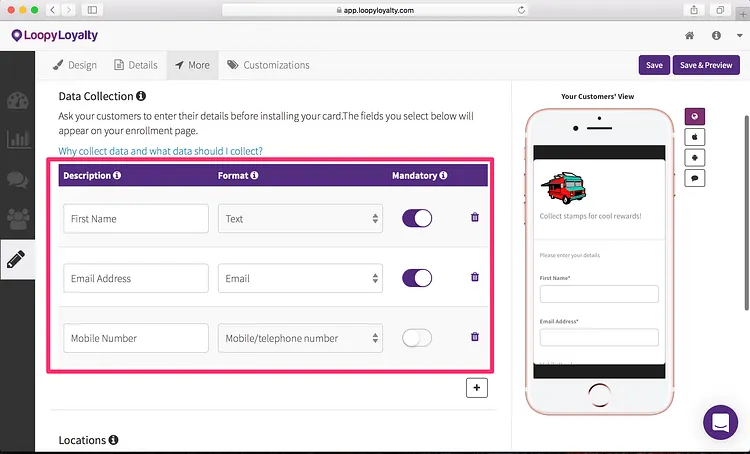
2 — Data collection: determine what information you want to collect from customers when they sign up for your digital loyalty card. This will appear on the enrollment form and all the information you collect will be stored in your ‘Customers’ page.
For example, collect your customer’s first name and email address. This will make it easy for you to identify customers later on and to get to know them personally!
You can preview how your enrollment page looks like on the right hand side.
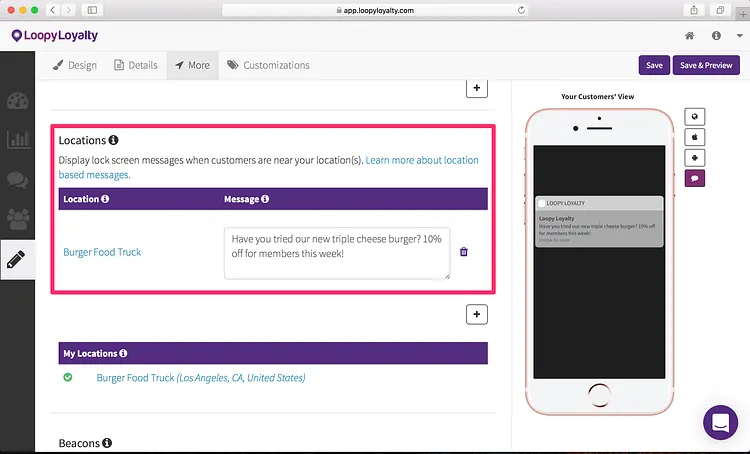
3 — Optional: trigger a message when your customers are near your food truck. All you need to do is add in your location add in your location and type in the message you want to display when they are near your nail salon.
For example: “Welcome to Burger Food Truck!” or “Have you tried our new triple cheese burger? 10% off for members this week!”
Learn more about how location based messages work here.
Step 4— Save & Activate your Digital Loyalty Card
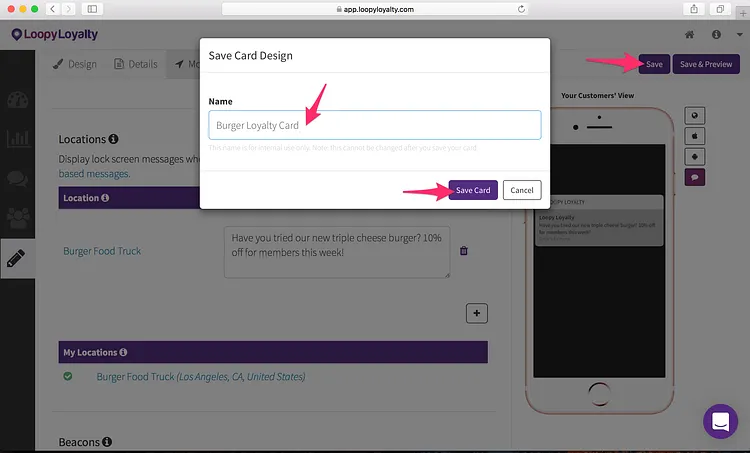
1 — Click on the ‘Save’ button in the top right and give your digital loyalty card a name. For example: “Burger Loyalty Card”.
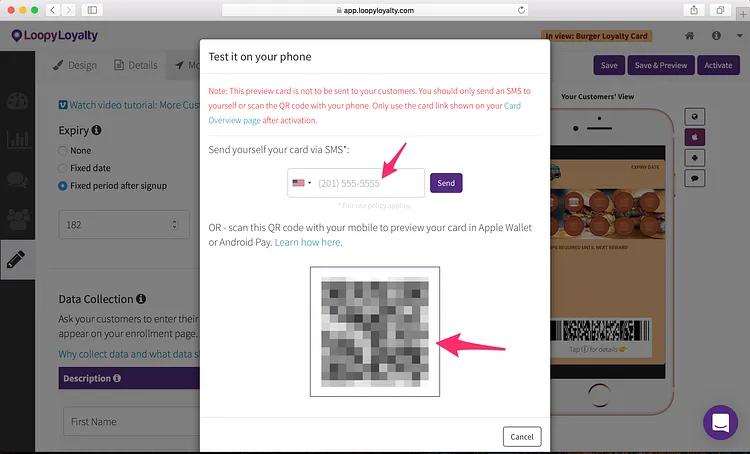
2 — Click on ‘Save & Preview’ to see what your digital loyalty card looks like in Apple Wallet or Google Pay. You can scan the QR code or send an SMS of the card URL to your phone.
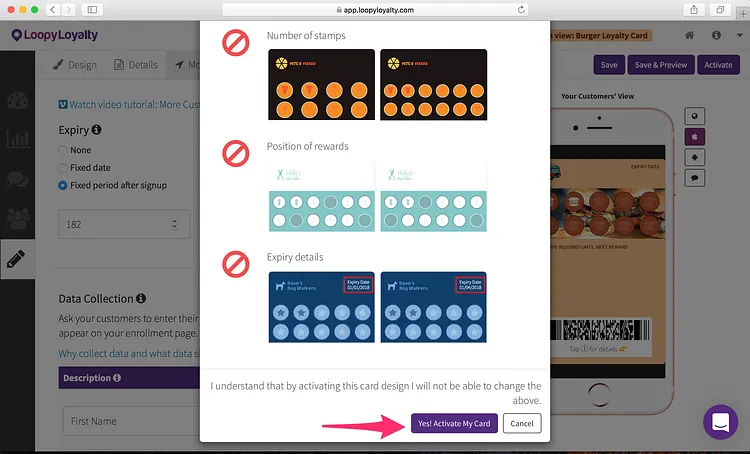
3 — When you’re 100% happy with your digital loyalty card, click on ‘Activate’ in the top right. Once you activate your card, you won’t be able to change these things.
And that’s it! Now you can start distributing your digital loyalty card to customers.
Go to your Dashboard and share your digital loyalty card URL / QR code with your customers.
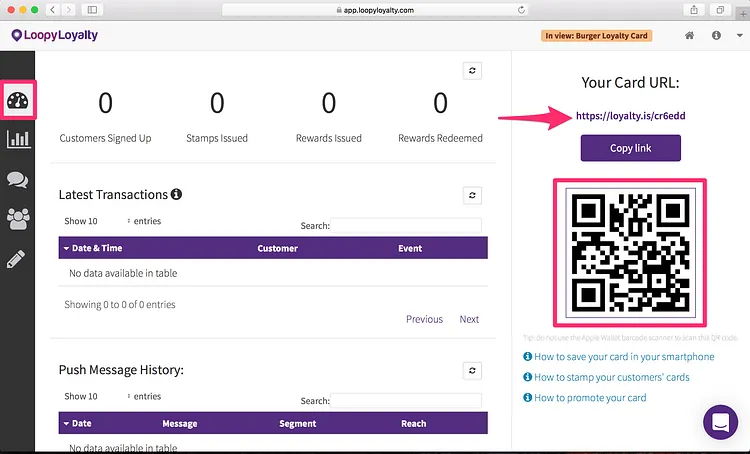
For your food truck, we would recommend that you share your digital loyalty card URL on:
- Create a poster/tent card and put it on your food truck or on your counter!
Get staff to encourage customers to enroll as well.
Before going live, please also download the digital stamper app so that your staff can issue stamps to customers after they’ve visited your food truck.
Pro tip: you can also issue stamps to customers through the web.
About Loopy Loyalty
Loopy Loyalty is the world’s only web application to create and manage digital stamp cards for Apple Wallet and Google Pay. Design your cards online, send push messages to customers, capture transaction history, and view detailed customer insights.
No tech knowledge needed. No app development required.
Learn more at https://loopyloyalty.com/.